<?xml version="1.0" encoding="utf-8"?><feed xmlns="http://www.w3.org/2005/Atom" xml:lang="en"><generator uri="https://jekyllrb.com/" version="3.10.0">Jekyll</generator><link href="https://hoondy.com/feed.xml" rel="self" type="application/atom+xml" /><link href="https://hoondy.com/" rel="alternate" type="text/html" hreflang="en" /><updated>2026-10-17T01:59:54+00:00</updated><id>https://hoondy.com/feed.xml</id><title type="html">Hoondy.com</title><subtitle>Hoondy Sq, a small station for side projects, games and odd ideas: a leadership test, a subway typing game, an artillery duel, and a blog going back to 2010.</subtitle><author><name>Hoondy</name><email>admin@hoondy.com</email></author><entry><title type="html">Do Not Call Registry</title><link href="https://hoondy.com/2019/11/05/do-not-call-registry/" rel="alternate" type="text/html" title="Do Not Call Registry" /><published>2019-11-05T00:00:00+00:00</published><updated>2019-11-05T00:00:00+00:00</updated><id>https://hoondy.com/2019/11/05/do-not-call-registry</id><content type="html" xml:base="https://hoondy.com/2019/11/05/do-not-call-registry/"><![CDATA[<p>I get lots of unsolicited marketing emails, text messages, and robocalls. This morning alone, I got 5 phone calls from numbers I don’t recognize and it is becoming extremely frustrating. My number has always been registered on the National Do Not Call registry, but this doesn’t seem to be very effective. Today, I decided to write a template text/email to fight back marketing and sales calls. I am not sure how effective this would be but the time will tell.</p>

<blockquote>
  <p>UNSUBSCRIBE: I would like to opt-out of any sales and marketing calls or texts, effective immediately. This number has been registered on the Do Not Call registry. An unsolicited call or text may be subject to fines of up to $42,530 per violation. Thanks for your cooperation.</p>
</blockquote>

<p>You are more than welcome to use my template.</p>

<p>-Hoondy</p>

<h3 id="reference">Reference</h3>
<ol>
  <li><a href="https://www.consumer.ftc.gov/articles/0108-national-do-not-call-registry#unwanted">FTC - What’s the penalty for companies that illegally call numbers on the Registry?</a></li>
</ol>]]></content><author><name>Hoondy</name><uri>https://hoondy.com/about/</uri></author><category term="Lifehack" /><category term="Lifehack" /><summary type="html"><![CDATA[I get lots of unsolicited marketing emails, text messages, and robocalls. This morning alone, I got 5 phone calls from numbers I don’t recognize and it is becoming extremely frustrating. My number has always been registered on the National Do Not Call registry, but this doesn’t seem to be very effective. Today, I decided to write a template text/email to fight back marketing and sales calls. I am not sure how effective this would be but the time will tell.]]></summary><media:thumbnail xmlns:media="http://search.yahoo.com/mrss/" url="https://hoondy.com/assets/img/og-default.png" /><media:content medium="image" url="https://hoondy.com/assets/img/og-default.png" xmlns:media="http://search.yahoo.com/mrss/" /></entry><entry><title type="html">Goodbye WordPress, Hello Jekyll</title><link href="https://hoondy.com/2016/05/12/goodbye-wordpress-hello-jekyll/" rel="alternate" type="text/html" title="Goodbye WordPress, Hello Jekyll" /><published>2016-05-12T00:00:00+00:00</published><updated>2016-05-12T00:00:00+00:00</updated><id>https://hoondy.com/2016/05/12/goodbye-wordpress-hello-jekyll</id><content type="html" xml:base="https://hoondy.com/2016/05/12/goodbye-wordpress-hello-jekyll/"><![CDATA[<p>I am happy to announce I’ve recently ported my blog from WordPress to Jekyll-based GitHub Pages. I’ve been a long time user of WordPress blog, hosted on a private web server from GoDaddy. About a month ago, I got a notification from GoDaddy saying they are retiring the web server I’ve been using for the past 6 years. They offered me the option to move all my contents to a new premium web server for free, but not for long. They said I would be automatically billed for this premium web hosting service after the first year.</p>

<p>WordPress is great and served me well, but I’ve also had many issues including:</p>

<ul>
  <li>It updates quite frequently and everytime it does, it tends to break one or two plugins.</li>
  <li>It was quite slow. It got slower and slower over time.</li>
  <li>Not free if you want to customize, requires a web server.</li>
</ul>

<p>Then I found out you can host a blog directly from your GitHub repository.</p>

<p>GitHub is a great alternative because:</p>

<ul>
  <li>It costs you nothing to maintain.</li>
  <li>Your blog is automatically version-controlled.</li>
  <li>The page loads and responds very fast.</li>
  <li>The server is very reliable.</li>
</ul>

<p>I have to confess I knew nothing about Jekyll a month ago (not known it existed), but apparantly, in short, it allows you to create a blog on GitHub. It is a ruby-based engine behind GitHub Pages that handles generating static HTML pages from Markdown (*.md) and it’s easy and great to work with.</p>

<p>So far, so good. Old WordPress site will still be available through <a href="http://wp.hoondy.com">wp.hoondy.com</a>.</p>

<p>-Hoondy</p>]]></content><author><name>Hoondy</name><uri>https://hoondy.com/about/</uri></author><category term="Announcement" /><category term="WordPress" /><category term="Jekyll" /><category term="GitHub" /><summary type="html"><![CDATA[I am happy to announce I’ve recently ported my blog from WordPress to Jekyll-based GitHub Pages. I’ve been a long time user of WordPress blog, hosted on a private web server from GoDaddy. About a month ago, I got a notification from GoDaddy saying they are retiring the web server I’ve been using for the past 6 years. They offered me the option to move all my contents to a new premium web server for free, but not for long. They said I would be automatically billed for this premium web hosting service after the first year.]]></summary><media:thumbnail xmlns:media="http://search.yahoo.com/mrss/" url="https://hoondy.com/assets/img/og-default.png" /><media:content medium="image" url="https://hoondy.com/assets/img/og-default.png" xmlns:media="http://search.yahoo.com/mrss/" /></entry><entry><title type="html">응메 – Reply Meh</title><link href="https://hoondy.com/2016/01/15/reply-meh/" rel="alternate" type="text/html" title="응메 – Reply Meh" /><published>2016-01-15T10:10:23+00:00</published><updated>2016-01-15T10:10:23+00:00</updated><id>https://hoondy.com/2016/01/15/reply-meh</id><content type="html" xml:base="https://hoondy.com/2016/01/15/reply-meh/"><![CDATA[<p><a href="/wp-content/uploads/2016/01/reply_meh_6plus_silver_portrait.png"><img class="aligncenter wp-image-500 size-medium" src="/wp-content/uploads/2016/01/reply_meh_6plus_silver_portrait-520x520.png" alt="응메 앱 화면" width="520" height="520" srcset="/wp-content/uploads/2016/01/reply_meh_6plus_silver_portrait-150x150.png 150w, /wp-content/uploads/2016/01/reply_meh_6plus_silver_portrait-520x520.png 520w, /wp-content/uploads/2016/01/reply_meh_6plus_silver_portrait-768x768.png 768w, /wp-content/uploads/2016/01/reply_meh_6plus_silver_portrait-1024x1024.png 1024w" sizes="(max-width: 520px) 100vw, 520px" /></a></p>

<p>응답하라 1988</p>

<p>요즘 아주 재미있게 보고 있습니다.</p>

<p>이제 내일이면 마지막회를 앞두고 있네요.. ㅠㅠ</p>

<p>사실 전 이전부터 응답하라 시리즈가 유행할 때 모르고 안 봤었습니다. 그러다 이번에 응답하라 1988로 응답하라 시리즈를 처음 보게됬는데.. 엄청 잼있네요. ^^</p>

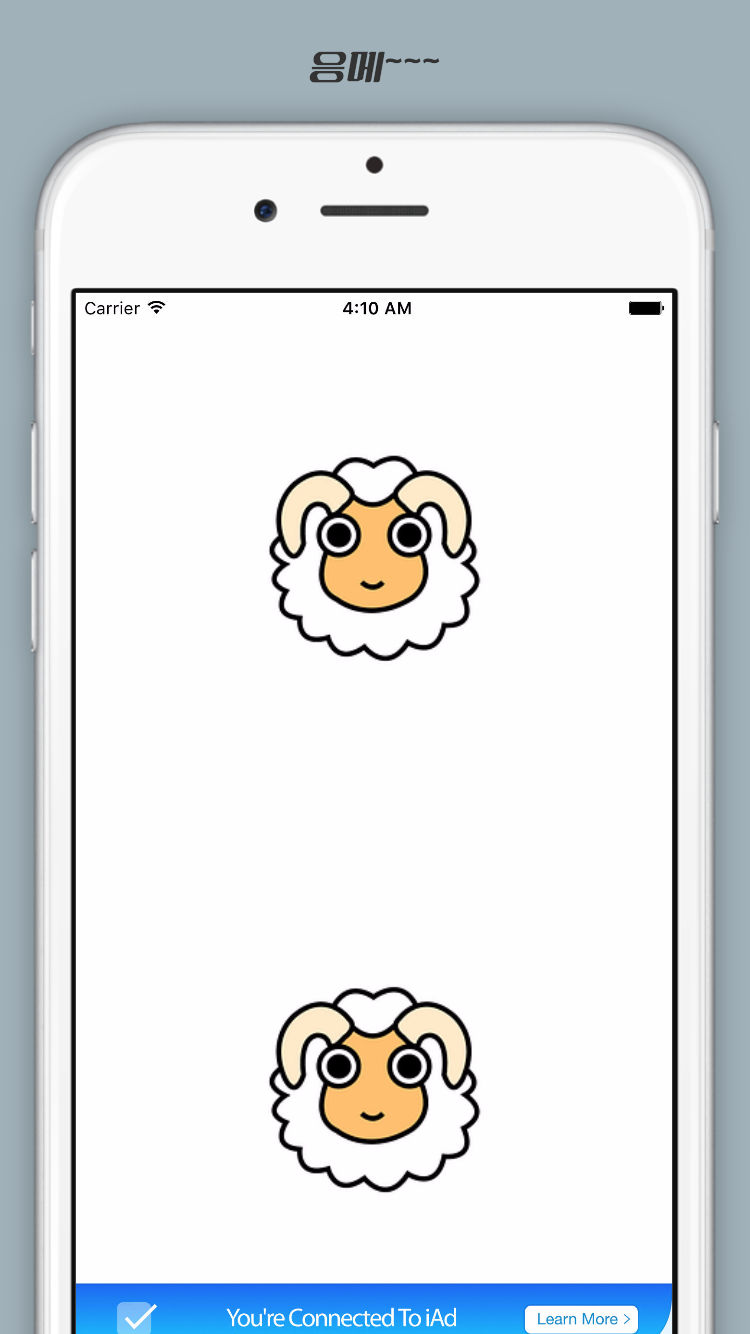
<p>드라마를 보다보니 왠 양소리인지 염소소리인지 뻘쭘할 때 마다 나오는 음메~~~ 소리가 자꾸 머리에 맴돌더라고요. 그래서 스마트폰에 넣어다니다가 뻘쭘할 때 써먹어야지~ 하고 찾아봤는데 이런 <del>쓰레기</del> 앱은 앱스토어에 없더라고요.. 그래서 한번 만들어 봤습니다. 응메~~~</p>

<p>처음 앱을 앱스토어에 올려봤는데 approval 받는게 엄청 까다롭네요. 뭐 하나 변경하면 심사받는데 최소 5일 걸리더라고요. 첫번째 1.0 버전이 통과되고 안 사실인데, 한국에서는 Apple의 iAd광고가 안뜬다고 하네요. 그래서 Google AdMob광고를 넣은 다음 버전을 바로 올렸는데.. 몇일째 아무소식이 없네요.. 응팔 끝나기전에 심사가 끝나길 바랬는데 ㅠㅠ</p>

<p><del>뭐 이런 허접한 앱을 누가 받을까 싶지만..</del> 응팔 잼있게 보고 계신분들 받아서 유용하게 쓰시길!</p>

<p>앱스토어에서 “응메” 찾아보세요. “음메” 아니고 “응메” 입니다! ㅋㅋㅋ (참고로 미국 앱스토어에서는 “Reply Meh”라고 찾아야 나옵니다.)</p>

<p><a href="https://itunes.apple.com/kr/app/eungme/id1071273436?ls=1&amp;mt=8" target="_blank">응메 – Reply Meh 다운로드 (한국 App Store)</a></p>

<p><a href="https://itunes.apple.com/us/app/eungme/id1071273436?ls=1&amp;mt=8" target="_blank">응메 – Reply Meh 다운로드 (US App Store)</a></p>

<p><a href="/wp-content/uploads/2016/01/0x0ss.jpg"><img class="wp-image-493 alignnone" src="/wp-content/uploads/2016/01/0x0ss-292x520.jpg" alt="응메 스크린샷 1" width="260" height="462" srcset="/wp-content/uploads/2016/01/0x0ss-576x1024.jpg 576w, /wp-content/uploads/2016/01/0x0ss.jpg 750w" sizes="(max-width: 260px) 100vw, 260px" /></a><a href="/wp-content/uploads/2016/01/0x0ss-1.jpg"><img class="wp-image-494 alignnone" src="/wp-content/uploads/2016/01/0x0ss-1-292x520.jpg" alt="응메 스크린샷 2" width="260" height="462" srcset="/wp-content/uploads/2016/01/0x0ss-1-576x1024.jpg 576w, /wp-content/uploads/2016/01/0x0ss-1.jpg 750w" sizes="(max-width: 260px) 100vw, 260px" /></a></p>]]></content><author><name>Hoondy</name><uri>https://hoondy.com/about/</uri></author><category term="App" /><category term="Funny" /><category term="iOS" /><category term="iPhone" /><category term="App" /><category term="iOS" /><category term="iPhone" /><category term="Objective-C" /><category term="응답하라" /><summary type="html"><![CDATA[응답하라 1988에서 어색할 때마다 나오던 '음메~' 소리를 버튼 하나로 들려주는 아이폰 앱, 응메(Reply Meh)를 만들었습니다.]]></summary><media:thumbnail xmlns:media="http://search.yahoo.com/mrss/" url="https://hoondy.com/assets/img/og-default.png" /><media:content medium="image" url="https://hoondy.com/assets/img/og-default.png" xmlns:media="http://search.yahoo.com/mrss/" /></entry><entry><title type="html">How to install Caffe on Mac OS X 10.10 for dummies (like me)</title><link href="https://hoondy.com/2015/04/03/how-to-install-caffe-on-mac-os-x-10-10-for-dummies-like-me/" rel="alternate" type="text/html" title="How to install Caffe on Mac OS X 10.10 for dummies (like me)" /><published>2015-04-03T15:45:02+00:00</published><updated>2015-04-03T15:45:02+00:00</updated><id>https://hoondy.com/2015/04/03/how-to-install-caffe-on-mac-os-x-10-10-for-dummies-like-me</id><content type="html" xml:base="https://hoondy.com/2015/04/03/how-to-install-caffe-on-mac-os-x-10-10-for-dummies-like-me/"><![CDATA[<p class="notice--info">Update: The instruction is also available in Chinese. I’d like to thank <strong>panovr</strong> for providing Chinese translation. (<a href="http://ylzhao.blogspot.com/2015/04/mac-os-x-1010caffe.html" title="http://ylzhao.blogspot.com/2015/04/mac-os-x-1010caffe.html">http://ylzhao.blogspot.com/2015/04/mac-os-x-1010caffe.html</a>)</p>

<p class="notice--primary">The following is a step-by-step guide for installing <strong>Caffe</strong> on <strong>Mac OS X</strong> (Tested with OS X Yosemite 10.10.3, mid-2014 rMBP with 2.8 GHz Intel Core i7, NVIDIA GeForce GT 750M 2048 MB)</p>

<hr />

<p>For the past couple of days, I struggled to get Caffe to work on my macbook. Caffe is a deep learning framework from Berkeley and you can read more about it at <a href="http://caffe.berkeleyvision.org/">http://caffe.berkeleyvision.org/</a>. If you are reading this, you probably have noticed you have to get dependencies setup correctly and download libraries and toolkits from several places or compilation will fail. Install documentation on the website was a bit out-dated, incomplete, and somewhat convoluted. So, I’ve decided to share my success story, and for simplicity’s sake, I made it into a step-by-step guide on how to install Caffe on Mac OS X. For the maximal computing performance, I made use of my fancy NVIDIA GPU and took advantage of <a href="https://developer.nvidia.com/cuDNN">NVIDA’s cuDNN GPU-accelerated library</a>.</p>

<p>Now, take a deep breath..</p>

<h3 id="homebrew"><strong>Homebrew</strong></h3>

<p>Install package manager for OSX called Homebrew</p>

<p><a href="http://brew.sh/">http://brew.sh/</a></p>

<h3 id="anaconda-python"><strong>Anaconda Python</strong></h3>

<p>Download and install Anaconda Python (includes hdf5, which is used by Caffe)</p>

<p><a href="https://store.continuum.io/cshop/anaconda/">https://store.continuum.io/cshop/anaconda/</a></p>

<p>Set PATH</p>

<div class="language-plaintext highlighter-rouge"><div class="highlight"><pre class="highlight"><code>export PATH=~/anaconda/bin:$PATH
</code></pre></div></div>

<h3 id="cuda"><strong>CUDA</strong></h3>

<p>Install CUDA 7.0 (for OSX)</p>

<p><a href="https://developer.nvidia.com/cuda-downloads">https://developer.nvidia.com/cuda-downloads</a></p>

<p>Install latest standalone CUDA driver (apparently, one included in CUDA Toolkit is outdated)</p>

<p><a href="http://www.nvidia.com/object/mac-driver-archive.html">http://www.nvidia.com/object/mac-driver-archive.html</a></p>

<p>Set PATH</p>

<div class="language-plaintext highlighter-rouge"><div class="highlight"><pre class="highlight"><code>export PATH=/Developer/NVIDIA/CUDA-7.0/bin:$PATH
</code></pre></div></div>

<p>Set DYLD_LIBRARY_PATH</p>

<div class="language-plaintext highlighter-rouge"><div class="highlight"><pre class="highlight"><code>export DYLD_LIBRARY_PATH=/Developer/NVIDIA/CUDA-7.0/lib:$DYLD_LIBRARY_PATH
</code></pre></div></div>

<h3 id="blas---intel-mkl"><strong>BLAS - Intel MKL</strong></h3>

<p>OSX native BLAS library has some instability issue. Alternatively, install Intel MKL (math kernal library, which is a component of Intel Parallel Studio XE Composer Edition) using free student license, <a href="https://software.intel.com/en-us/qualify-for-free-software/student">https://software.intel.com/en-us/qualify-for-free-software/student</a> (Later, don’t forget to set BLAS := mkl in Makefile.config)</p>

<p>Make sure to select every components in Intel Parallel Studio XE (honestly, I don’t know what’s used and what’s not, but apparently default installation was missing some components)</p>

<div class="language-plaintext highlighter-rouge"><div class="highlight"><pre class="highlight"><code>cd /opt/intel/mkl/lib/

sudo ln -s . /opt/intel/mkl/lib/intel64
</code></pre></div></div>

<h3 id="cudnn"><strong>cuDNN</strong></h3>

<p>Install NVIDIA cuDNN from <a href="https://developer.nvidia.com/cudnn">https://developer.nvidia.com/cudnn</a> (Later, don’t forget to uncomment the USE_CUDNN := 1 flag in Makefile.config). You first need to signup and get approved by NVIDIA CUDA Register Developer Program.</p>

<div class="language-plaintext highlighter-rouge"><div class="highlight"><pre class="highlight"><code>tar -xzvf cudnn-6.5-osx-v2.tgz

cd cudnn-6.5-osx-v2

sudo cp lib* /usr/local/cuda/lib

sudo cp cudnn.h /usr/local/cuda/include/
</code></pre></div></div>

<h3 id="dependencies-via-homebrew"><strong>Dependencies via homebrew</strong></h3>

<p>First, we need to modify something..</p>

<div class="language-plaintext highlighter-rouge"><div class="highlight"><pre class="highlight"><code>brew edit opencv
</code></pre></div></div>

<p>Replace the following lines</p>

<div class="language-plaintext highlighter-rouge"><div class="highlight"><pre class="highlight"><code>args &lt;&lt; "-DPYTHON#{py_ver}_LIBRARY=#{py_lib}/libpython2.7.#{dylib}"
args &lt;&lt; "-DPYTHON#{py_ver}_INCLUDE_DIR=#{py_prefix}/include/python2.7"
</code></pre></div></div>

<p>with</p>

<div class="language-plaintext highlighter-rouge"><div class="highlight"><pre class="highlight"><code>args &lt;&lt; "-DPYTHON_LIBRARY=#{py_prefix}/lib/libpython2.7.dylib"
args &lt;&lt; "-DPYTHON_INCLUDE_DIR=#{py_prefix}/include/python2.7"
</code></pre></div></div>

<p>then</p>

<div class="language-plaintext highlighter-rouge"><div class="highlight"><pre class="highlight"><code>brew install --fresh -vd snappy leveldb gflags glog szip lmdb homebrew/science/opencv

brew install --build-from-source --with-python --fresh -vd protobuf
brew install --build-from-source --fresh -vd boost boost-python
</code></pre></div></div>

<h3 id="download-caffe-from-github"><strong>Download Caffe from GitHub</strong></h3>

<p>From your home directory or any directory you want to download caffe</p>

<div class="language-plaintext highlighter-rouge"><div class="highlight"><pre class="highlight"><code>git clone https://github.com/BVLC/caffe.git

cd caffe

cp Makefile.config.example Makefile.config
</code></pre></div></div>

<h3 id="makefileconfig"><strong>Makefile.config</strong></h3>

<p>Open Makefile.config file and edit the following:</p>

<div class="language-plaintext highlighter-rouge"><div class="highlight"><pre class="highlight"><code>BLAS := mkl
</code></pre></div></div>

<p>Uncomment CUDNN to enable GPU support</p>

<div class="language-plaintext highlighter-rouge"><div class="highlight"><pre class="highlight"><code>USE_CUDNN := 1
</code></pre></div></div>

<p>Check your Python path</p>

<p>Read through each line carefully and modify configuration to suit your need!!!</p>

<h3 id="environment-variables"><strong>Environment variables</strong></h3>

<p>Set following environmental variables:</p>

<div class="language-plaintext highlighter-rouge"><div class="highlight"><pre class="highlight"><code>export DYLD_FALLBACK_LIBRARY_PATH=/usr/local/cuda/lib:$HOME/anaconda/lib:/usr/local/lib:/usr/lib:/opt/intel/composer_xe_2015.2.132/compiler/lib:/opt/intel/composer_xe_2015.2.132/mkl/lib
</code></pre></div></div>

<h3 id="lets-make-caffe"><strong>Let’s make Caffe</strong></h3>

<p>Make and test</p>

<div class="language-plaintext highlighter-rouge"><div class="highlight"><pre class="highlight"><code>make clean

make all -j8

make test

make runtest
</code></pre></div></div>

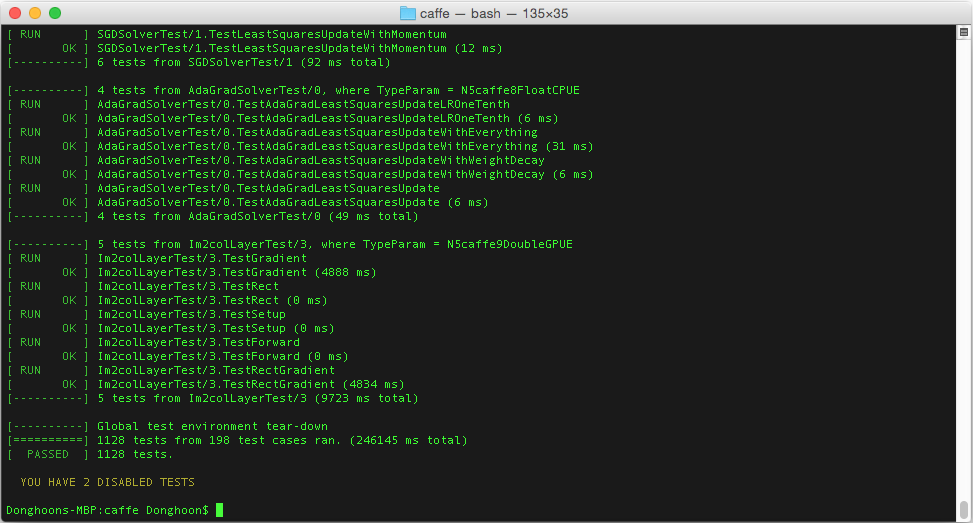
<p>You should get a message like the following. You can safely ignore disabled tests.</p>

<div class="language-plaintext highlighter-rouge"><div class="highlight"><pre class="highlight"><code>[----------] Global test environment tear-down
[==========] 1128 tests from 198 test cases ran. (282609 ms total)
[  PASSED  ] 1128 tests.

YOU HAVE 2 DISABLED TESTS
</code></pre></div></div>

<p>Now make pycaffe and distribute.</p>

<div class="language-plaintext highlighter-rouge"><div class="highlight"><pre class="highlight"><code>  make pycaffe
  
  make distribute
</code></pre></div></div>

<p><a href="/wp-content/uploads/2015/04/Screen-Shot-2015-04-03-at-8.49.59-PM1.png"><img class="aligncenter wp-image-480" src="/wp-content/uploads/2015/04/Screen-Shot-2015-04-03-at-8.49.59-PM1.png" alt="Screen Shot 2015-04-03 at 8.49.59 PM" width="520" height="280" srcset="/wp-content/uploads/2015/04/Screen-Shot-2015-04-03-at-8.49.59-PM1-300x161.png 300w, /wp-content/uploads/2015/04/Screen-Shot-2015-04-03-at-8.49.59-PM1.png 973w" sizes="(max-width: 520px) 100vw, 520px" /></a></p>

<p>Enjoy!</p>

<p>(Last updated: 05/04/2016)</p>

<p><strong>Note 1:</strong> CUDA 6 the 32-bit and 64-bit library files were merged under /usr/local/cuda/lib</p>

<p><strong>Note 2:</strong> To run CUDA applications in console mode on MacBook Pro with both an integrated GPU and a discrete GPU, use the following settings before dropping to console mode: Uncheck <strong>System Preferences</strong> &gt; <strong>Energy Saver</strong> &gt; <strong>Automatic Graphic Switch</strong></p>

<p><strong>Note 3:</strong> You might need the following environment variables for Intel MKL. I didn’t needed.</p>

<div class="language-plaintext highlighter-rouge"><div class="highlight"><pre class="highlight"><code>export MKLROOT=/opt/intel/composer_xe_2015.2.132/mkl
export DYLD_LIBRARY_PATH=/opt/intel/composer_xe_2015.2.132/compiler/lib:/opt/intel/composer_xe_2015.2.132/mkl/lib:$DYLD_LIBRARY_PATH
export LIBRARY_PATH=/opt/intel/composer_xe_2015.2.132/compiler/lib:/opt/intel/composer_xe_2015.2.132/mkl/lib:$LIBRARY_PATH
export NLSPATH=/opt/intel/composer_xe_2015.2.132/mkl/lib/locale/%l_%t/%N:$NLSPATH
export MANPATH=/opt/intel/composer_xe_2015.2.132/man/en_US:/usr/local/share/man:/usr/share/man:/opt/intel/man:$MANPATH
export INCLUDE=/opt/intel/composer_xe_2015.0.077/mkl/include:$INCLUDE
export CPATH=/opt/intel/composer_xe_2015.2.132/mkl/include:/opt/intel/composer_xe_2015.2.132/mkl/bin/intel64/mklvars_intel64.sh:$CPATH
</code></pre></div></div>

<h3 id="references"><strong>References:</strong></h3>

<ol>
  <li><a href="http://caffe.berkeleyvision.org/installation.html">http://caffe.berkeleyvision.org/installation.html</a></li>
  <li><a href="http://docs.nvidia.com/cuda/cuda-getting-started-guide-for-mac-os-x/">http://docs.nvidia.com/cuda/cuda-getting-started-guide-for-mac-os-x/</a></li>
  <li><a href="https://github.com/BVLC/caffe/wiki/Installation-%28OSX%29">https://github.com/BVLC/caffe/wiki/Installation-%28OSX%29</a></li>
  <li><a href="https://aisgit.informatik.uni-freiburg.de/zhang/caffe_future/blob/ais-master/docs/installation.md">https://aisgit.informatik.uni-freiburg.de/zhang/caffe_future/blob/ais-master/docs/installation.md</a></li>
  <li><a href="https://haduonght.wordpress.com/2015/02/21/install-caffe-on-mac-os-x-10-10/">https://haduonght.wordpress.com/2015/02/21/install-caffe-on-mac-os-x-10-10/</a></li>
  <li><a href="http://smrmkt.hatenablog.jp/entry/2015/02/11/195213">http://smrmkt.hatenablog.jp/entry/2015/02/11/195213</a></li>
</ol>]]></content><author><name>Hoondy</name><uri>https://hoondy.com/about/</uri></author><category term="Bioinformatics" /><category term="Caffe" /><category term="Deep Learning" /><category term="Genetics" /><category term="How-To" /><category term="Linux" /><category term="Mac" /><category term="Machine Learning" /><category term="OS X" /><category term="Caffe" /><category term="CUDA" /><category term="cuDNN" /><category term="Deep Learning" /><category term="Mac" /><category term="Machine Learning" /><category term="MKL" /><category term="Neural Network" /><category term="NVIDIA" /><category term="OS X" /><category term="Python" /><summary type="html"><![CDATA[A step-by-step guide to building the Caffe deep learning framework on Mac OS X 10.10, with Homebrew, Anaconda, CUDA and cuDNN.]]></summary><media:thumbnail xmlns:media="http://search.yahoo.com/mrss/" url="https://hoondy.com/assets/img/og-default.png" /><media:content medium="image" url="https://hoondy.com/assets/img/og-default.png" xmlns:media="http://search.yahoo.com/mrss/" /></entry><entry><title type="html">DONGHOON + HAYOUNG</title><link href="https://hoondy.com/2014/05/03/donghoonhayoung/" rel="alternate" type="text/html" title="DONGHOON + HAYOUNG" /><published>2014-05-03T13:31:26+00:00</published><updated>2014-05-03T13:31:26+00:00</updated><id>https://hoondy.com/2014/05/03/donghoonhayoung</id><content type="html" xml:base="https://hoondy.com/2014/05/03/donghoonhayoung/"><![CDATA[<p><a href="/wp-content/uploads/2014/05/DH1-e1399091102751.png"><img class="aligncenter size-full wp-image-441" alt="DH1" src="/wp-content/uploads/2014/05/DH1-e1399091102751.png" width="520" height="520" /></a></p>

<p><a href="/wp-content/uploads/2014/05/DH2-e1399091172913.png"><img class="aligncenter size-full wp-image-442" alt="DH2" src="/wp-content/uploads/2014/05/DH2-e1399091172913.png" width="520" height="520" /></a></p>

<p><a href="/wp-content/uploads/2014/05/DH3-e1399091233146.png"><img class="aligncenter size-full wp-image-443" alt="DH3" src="/wp-content/uploads/2014/05/DH3-e1399091233146.png" width="520" height="520" /></a></p>

<p><a href="/wp-content/uploads/2014/05/DH4-e1399091296554.png"><img class="aligncenter size-full wp-image-444" alt="DH4" src="/wp-content/uploads/2014/05/DH4-e1399091296554.png" width="520" height="520" /></a></p>]]></content><author><name>Hoondy</name><uri>https://hoondy.com/about/</uri></author><category term="Announcement" /><category term="Wedding" /><summary type="html"><![CDATA[A wedding announcement, May 2014.]]></summary><media:thumbnail xmlns:media="http://search.yahoo.com/mrss/" url="https://hoondy.com/assets/img/og-default.png" /><media:content medium="image" url="https://hoondy.com/assets/img/og-default.png" xmlns:media="http://search.yahoo.com/mrss/" /></entry><entry><title type="html">THEBESTLAP BATTLE – Episode 1</title><link href="https://hoondy.com/2014/01/14/thebestlap-battle-episode-1/" rel="alternate" type="text/html" title="THEBESTLAP BATTLE – Episode 1" /><published>2014-01-14T10:12:26+00:00</published><updated>2014-01-14T10:12:26+00:00</updated><id>https://hoondy.com/2014/01/14/thebestlap-battle-episode-1</id><content type="html" xml:base="https://hoondy.com/2014/01/14/thebestlap-battle-episode-1/"><![CDATA[<p>The BESTLAP presents the first episode of track battle video series featuring Porsche Carrera S, Porsche Boxster S, Ferrari California, Jaguar F-Type S, and Jaguar F-Type V8S. The race took place in Korea International Circuit, Yeongam, Jeolla, Korea, the home of F1 Korea Grand Prix.</p>

<p>Hope you enjoy and don’t forget to watch the drag racing between McLaren MP4-12C and Ferrari 458 Spider at the end!</p>

<iframe width="640" height="360" src="https://www.youtube.com/embed/3AHk94KSGx0" frameborder="0" allowfullscreen=""></iframe>

<p>2014년 시작과 함께 베스트랩에서 준비한 첫번째 베틀영상을 공개합니다. 시리즈로 제작될 베틀영상중 1편이며, 향후 좀더 다양한 내용으로 후속작을 발표할 예정입니다. 많은 관심과 응원 부탁드립니다.</p>

<p>드라이버 – 간략프로필</p>

<p>어령해 – 클릭페스티벌 씨즌 챔피언,KMSA내구 테스트 드라이버</p>

<p>김택성 – 페라리 챌린지 피렐리클레스/람보르기니 블랑팡 클레스 우승</p>

<p>윤정준 – KMSA내구 테스트 드라이버,KIC F1 코스 3,000LAP+ 주행</p>

<p>김돈영 – KMSA내구 테스트 드라이버,KIC F1 코스 4,000LAP+주행</p>

<p>최정원 – KMSA내구 테스트 드라이버,KIC F1 코스 11,000LAP+주행</p>

<p>출연차량</p>

<p>포르쉐 – 박스터 S/ 까레라 S</p>

<p>페라리 – 켈리포니아</p>

<p>제규어 – F-Type S/ F-Type V8S</p>

<p>Thank You</p>

<p>핸즈 코퍼레이션</p>

<p>포르쉐 코리아(Stuttgart Sportscars Ltd.)</p>

<p>제규어 코리아(JAGUAR KOREA)</p>

<p>고프로 코리아(GOPRO KOREA)</p>

<p>KMSA</p>

<p>인모션모터스</p>

<p>염승훈</p>

<p>최진현</p>

<p>장소 : KOREA INTERNATIONAL CIRCUIT(F1 TRACK)</p>

<p>감사합니다.</p>

<p><a style="line-height: 1.5em; text-align: center;" href="/wp-content/uploads/2014/01/346908a4f6f9960e6e4fe50f4f79d12b_6hriXv8a15XgHjdOZM.jpg"><img class="wp-image-427 alignnone" alt="thebestlap" src="/wp-content/uploads/2014/01/346908a4f6f9960e6e4fe50f4f79d12b_6hriXv8a15XgHjdOZM.jpg" width="520" height="293" srcset="/wp-content/uploads/2014/01/346908a4f6f9960e6e4fe50f4f79d12b_6hriXv8a15XgHjdOZM-300x169.jpg 300w, /wp-content/uploads/2014/01/346908a4f6f9960e6e4fe50f4f79d12b_6hriXv8a15XgHjdOZM.jpg 781w" sizes="(max-width: 520px) 100vw, 520px" /></a></p>]]></content><author><name>Hoondy</name><uri>https://hoondy.com/about/</uri></author><category term="Automotive" /><category term="GoPro" /><category term="Motorsports" /><category term="Videos" /><summary type="html"><![CDATA[The BESTLAP presents the first episode of track battle video series featuring Porsche Carrera S, Porsche Boxster S, Ferrari California, Jaguar F-Type S, and Jaguar F-Type V8S. The race took place in Korea International Circuit, Yeongam, Jeolla, Korea, the home of F1 Korea Grand Prix.]]></summary><media:thumbnail xmlns:media="http://search.yahoo.com/mrss/" url="https://hoondy.com/assets/img/og-default.png" /><media:content medium="image" url="https://hoondy.com/assets/img/og-default.png" xmlns:media="http://search.yahoo.com/mrss/" /></entry><entry><title type="html">Driving in Korea (강원도편)</title><link href="https://hoondy.com/2013/04/24/driving-in-korea-ea-b0-95-ec-9b-90-eb-8f-84-ed-8e-b8/" rel="alternate" type="text/html" title="Driving in Korea (강원도편)" /><published>2013-04-24T23:40:11+00:00</published><updated>2013-04-24T23:40:11+00:00</updated><id>https://hoondy.com/2013/04/24/driving-in-korea-%EA%B0%95%EC%9B%90%EB%8F%84%ED%8E%B8</id><content type="html" xml:base="https://hoondy.com/2013/04/24/driving-in-korea-ea-b0-95-ec-9b-90-eb-8f-84-ed-8e-b8/"><![CDATA[<iframe width="640" height="360" src="https://www.youtube.com/embed/Ya3nh7OWXzk" frameborder="0" allowfullscreen=""></iframe>]]></content><author><name>Hoondy</name><uri>https://hoondy.com/about/</uri></author><category term="Automotive" /><category term="GoPro" /><category term="Videos" /><category term="1M" /><category term="Driving" /><category term="GoPro" /><category term="Korea" /><summary type="html"><![CDATA[GoPro footage from behind the wheel of a BMW 1M on the roads of Gangwon-do, Korea.]]></summary><media:thumbnail xmlns:media="http://search.yahoo.com/mrss/" url="https://hoondy.com/assets/img/og-default.png" /><media:content medium="image" url="https://hoondy.com/assets/img/og-default.png" xmlns:media="http://search.yahoo.com/mrss/" /></entry><entry><title type="html">Korean 4th Grade Math Quiz</title><link href="https://hoondy.com/2013/01/24/korean-4th-grade-math-quiz/" rel="alternate" type="text/html" title="Korean 4th Grade Math Quiz" /><published>2013-01-24T11:10:15+00:00</published><updated>2013-01-24T11:10:15+00:00</updated><id>https://hoondy.com/2013/01/24/korean-4th-grade-math-quiz</id><content type="html" xml:base="https://hoondy.com/2013/01/24/korean-4th-grade-math-quiz/"><![CDATA[<p><a href="/wp-content/uploads/2013/01/71803_416503151773567_1390506458_n.jpg" rel="attachment wp-att-398"><img class="aligncenter  wp-image-398" alt="71803_416503151773567_1390506458_n" src="/wp-content/uploads/2013/01/71803_416503151773567_1390506458_n.jpg" width="446" height="258" srcset="/wp-content/uploads/2013/01/71803_416503151773567_1390506458_n-300x173.jpg 300w, /wp-content/uploads/2013/01/71803_416503151773567_1390506458_n.jpg 619w" sizes="(max-width: 446px) 100vw, 446px" /></a></p>

<p>

Pretty much self-explanatory even if you don't understand Korean.

In triangle ㄱㄴㄷ, ㄴㄹ = ㄹㅁ = ㅁㄷ. Find angle ㄱㄹㅁ.

<p>
</p></p>]]></content><author><name>Hoondy</name><uri>https://hoondy.com/about/</uri></author><category term="Quiz" /><category term="4th Grade" /><category term="Korean" /><category term="Math" /><category term="Quiz" /><summary type="html"><![CDATA[A geometry puzzle from a Korean 4th-grade math book: in triangle ㄱㄴㄷ, ㄴㄹ = ㄹㅁ = ㅁㄷ. Find angle ㄱㄹㅁ.]]></summary><media:thumbnail xmlns:media="http://search.yahoo.com/mrss/" url="https://hoondy.com/assets/img/og-default.png" /><media:content medium="image" url="https://hoondy.com/assets/img/og-default.png" xmlns:media="http://search.yahoo.com/mrss/" /></entry><entry><title type="html">Mensa Quiz</title><link href="https://hoondy.com/2013/01/24/mensa-quiz/" rel="alternate" type="text/html" title="Mensa Quiz" /><published>2013-01-24T10:56:53+00:00</published><updated>2013-01-24T10:56:53+00:00</updated><id>https://hoondy.com/2013/01/24/mensa-quiz</id><content type="html" xml:base="https://hoondy.com/2013/01/24/mensa-quiz/"><![CDATA[<p style="text-align: center;">
  <a href="/wp-content/uploads/2013/01/734325_132396900257870_1916502_n.jpg" rel="attachment wp-att-393"><img class="aligncenter size-full wp-image-393" alt="734325_132396900257870_1916502_n" src="/wp-content/uploads/2013/01/734325_132396900257870_1916502_n.jpg" width="365" height="313" srcset="/wp-content/uploads/2013/01/734325_132396900257870_1916502_n-300x257.jpg 300w, /wp-content/uploads/2013/01/734325_132396900257870_1916502_n.jpg 365w" sizes="(max-width: 365px) 100vw, 365px" /></a>
</p>

<p style="text-align: center;">
  Find A, B, and C.
</p>]]></content><author><name>Hoondy</name><uri>https://hoondy.com/about/</uri></author><category term="Quiz" /><category term="Mensa" /><category term="Quiz" /><summary type="html"><![CDATA[A Mensa-style picture puzzle: find A, B, and C.]]></summary><media:thumbnail xmlns:media="http://search.yahoo.com/mrss/" url="https://hoondy.com/assets/img/og-default.png" /><media:content medium="image" url="https://hoondy.com/assets/img/og-default.png" xmlns:media="http://search.yahoo.com/mrss/" /></entry><entry><title type="html">BMW 1M Onboard Driving in Seoul, Korea</title><link href="https://hoondy.com/2012/08/03/bmw-1m-onboard-driving-in-seoul-korea/" rel="alternate" type="text/html" title="BMW 1M Onboard Driving in Seoul, Korea" /><published>2012-08-03T12:48:44+00:00</published><updated>2012-08-03T12:48:44+00:00</updated><id>https://hoondy.com/2012/08/03/bmw-1m-onboard-driving-in-seoul-korea</id><content type="html" xml:base="https://hoondy.com/2012/08/03/bmw-1m-onboard-driving-in-seoul-korea/"><![CDATA[<p>Time-lapse</p>

<iframe width="640" height="480" src="https://www.youtube.com/embed/IK3mtOotjv8" frameborder="0" allowfullscreen=""></iframe>

<p>Fast forward</p>

<iframe width="640" height="480" src="https://www.youtube.com/embed/7DlazqE_uqQ" frameborder="0" allowfullscreen=""></iframe>]]></content><author><name>Hoondy</name><uri>https://hoondy.com/about/</uri></author><category term="Automotive" /><category term="GoPro" /><category term="Videos" /><category term="1M" /><category term="BMW" /><category term="GoPro" /><summary type="html"><![CDATA[Time-lapse]]></summary><media:thumbnail xmlns:media="http://search.yahoo.com/mrss/" url="https://hoondy.com/assets/img/og-default.png" /><media:content medium="image" url="https://hoondy.com/assets/img/og-default.png" xmlns:media="http://search.yahoo.com/mrss/" /></entry></feed>